 Mr. Latte Story
Card payment problems when building on PayPal
Mr. Latte / Indie maker, Product builder

This English page is a machine translation of the Korean original, so some wording may read a little off.
Problem
If you are building a paid service for users at home and abroad, PayPal1 is worth considering as the payment system.
Plenty of people in Korea also use PayPal when paying for overseas services, and that is where the problem I ran into can show up.
One thing to note before adopting PayPal: a business registered in Korea cannot offer it. Payments from users in Korea are fine.
In my case the service was operated by a business outside Korea, payments had to work for users both inside and outside the country, and money had to move abroad freely afterward, so PayPal and its strengths in multi-currency payments and transfers was the only real option.
Guest checkout error
The following error appeared during a payment attempt. The customer assumed it was a system problem and got in touch.
We can't add this card. Please check that all the details are correct and try again, or try a different card.
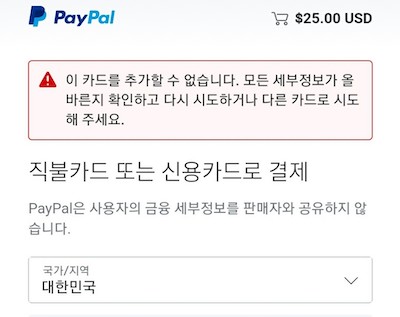
The customer was not paying as a logged-in PayPal user. They entered the card number directly through guest checkout. Judging by the cause I eventually found, that message is more likely to appear on the second payment onward than on the first.
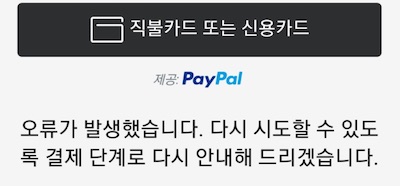
Depending on the UI, the message could also read as below. It seems this version shows up when the flow is not the popup UI. The message changing with the situation made the cause harder to pin down.
Something went wrong. We'll take you back to the payment step so you can try again.
Asking PayPal
With the error in hand, I contacted PayPal.
As of December 2020, PayPal had no phone support, only chat after signing in, through the PayPal Message Center2.
That flow gets frustrating when a problem is urgent, although PayPal did call back on an international number when they judged something to be truly urgent.
There was no way to ask without signing in, so I signed in with my own account and asked about the customer's error.
Because it was a guest checkout, I could not get a real answer.
As this was a guest checkout, we are unable to check it in our PayPal system. We are sorry we cannot help further.
PayPal appeared to have no way at all to see what happened on a guest checkout.
Getting an issue on an overseas PayPal account explained by a Korean support agent was also difficult.
Asking the customer to sign up and add the card
To pin down the cause, I asked the customer to create a PayPal account. That is a lot to ask in general, but they helped so we could find the problem.
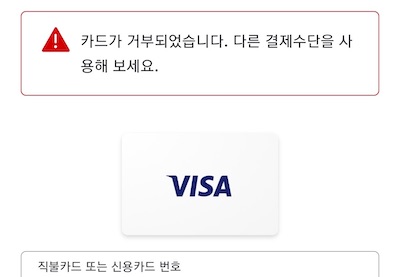
The customer signed up and tried to add the card. The error continued:
Your card was declined. Please try a different payment method.
Asking PayPal again
Now that the cause could be traced, I contacted PayPal again.
This time support found it.
Solution
When identity verification does not complete automatically in our system, the card can be restricted to protect its funds.
That was the answer. Identity verification had failed to complete automatically on the first payment a while earlier, which caused the restriction. Support said it happens to other users often.
Lifting the restriction required three photos. After sending them to the agent, it was released within one or two minutes.
- Front of the credit card
- Back of the credit card, with the
cvccode removed - Front of an ID such as a driver's license, with the second half of the resident registration number removed
Summary
Given all of this, here is how to cut down support load when building a service on PayPal.
- We can't add this card. Please check that all the details are correct and try again, or try a different card.
- Check whether it was a guest checkout, check the payment history, and guide the user to sign up for
PayPaland add the card
- Check whether it was a guest checkout, check the payment history, and guide the user to sign up for
- Something went wrong. We'll take you back to the payment step so you can try again.
- Check whether it was a guest checkout, check the payment history, and guide the user to sign up for
PayPaland add the card
- Check whether it was a guest checkout, check the payment history, and guide the user to sign up for
- If the card still cannot be added after signing up for
PayPal, tell the user to contact support directly- This is the case where automatic identity verification failed and the card was restricted to protect its funds
- Photos of the credit card, front and back, plus a photo of an ID are required